
Zoom vs Google Meet: Which is Best for Family Video Calls?
If WhatsApp and FaceTime are the apps most people use for one-to-one calls, Zoom and Google Meet are the two most popular choices for bigger family get-togethers — birthdays, Christmas catch-ups, or anything with more than a couple of people joining in. Both are free to use, both work well, and both have their own particular strengths. Here's an honest, plain-English comparison to help you choose.
Free Calls for Seniors
6/22/20262 min read
What is Zoom?
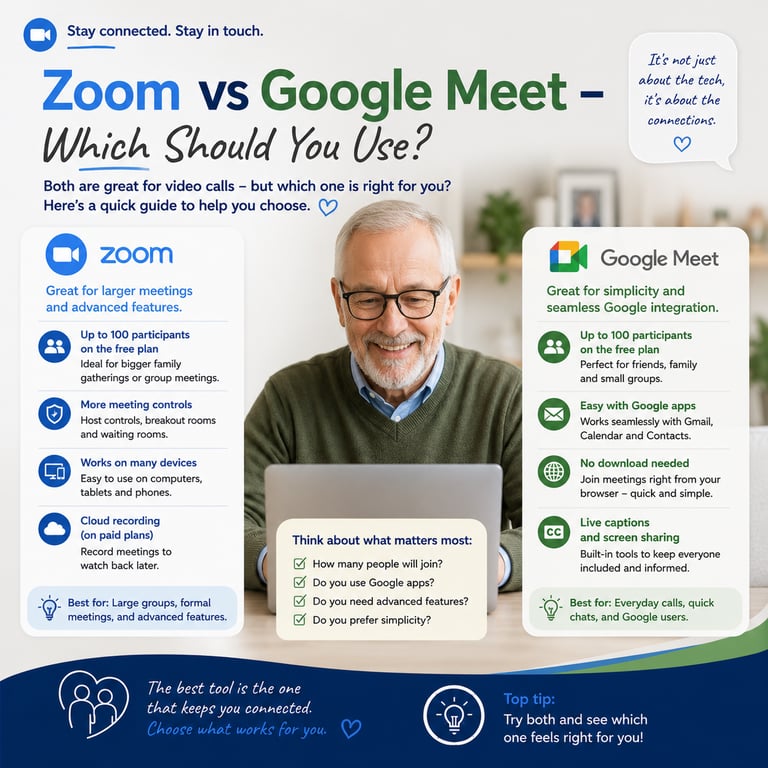
Zoom is a video calling app that became hugely popular during the pandemic and has remained a go-to choice for group calls ever since. It works on phones, tablets, and computers, and anyone you invite can join using a simple link — they don't even need to create an account.
Zoom's free plan allows unlimited one-to-one calls, but group calls (three or more people) are limited to 40 minutes. After that, you'll need to start a new call.
What is Google Meet?
Google Meet is Google's video calling app, and it's particularly good if you already use Gmail. When you create an event in Google Calendar, a Meet video call link is automatically generated — no extra steps needed.
Google Meet's free plan allows group calls of up to 60 minutes, a full 20 minutes longer than Zoom's free tier.
The honest comparison
Time limit: Google Meet wins — 60 minutes free vs Zoom's 40 minutes
Ease of booking: Google Meet wins if you use Gmail and Google Calendar already
Familiarity: Zoom is still the more recognised name for many people, especially after the pandemic
Screen sharing and backgrounds: both apps offer these, and they work equally well
Joining a call: both are equally simple — just click the link you're sent
Why does this matter for GP appointments?
Many NHS video consultations now use video calling systems similar to Zoom and Google Meet. Getting comfortable with either app at home — chatting to family — means you'll feel far more confident if your GP surgery ever books you in for a video appointment instead of an in-person visit.
Our honest recommendation
If your family already uses Gmail and Google Calendar, Google Meet is the simpler choice — it fits naturally into how you're probably already organising things, and you get a longer free call time.
If you're not particularly tied to Gmail, or your family already has experience with Zoom, there's no need to switch — just keep an eye on that 40-minute limit and be ready to simply restart the call if you run over.
Getting started with either app
Download the app from your phone's App Store or Google Play (or use it directly in a web browser on a computer)
Wait for the person organising the call to send you a link
Tap or click the link at the time of the call
Allow the app to use your camera and microphone when prompted
You're in! Smile and say hello 😊
A quick tip for bigger family calls
If you know the call is likely to run long — a big family catch-up, for example — Google Meet's longer free time limit will save you the hassle of restarting the call partway through. Worth bearing in mind when you're the one organising it.
For full step-by-step guides to both Zoom and Google Meet — as well as WhatsApp and FaceTime — visit freecallsforseniors.co.uk. Everything is written in plain English, designed specifically for older adults.
Free Calls for Seniors
Guides and tips for easy calls
Contact
Subscribe
© 2026. All rights reserved.