
FaceTime vs WhatsApp: Which Is Better for Seniors?
If you've ever wondered whether to use FaceTime or WhatsApp for video calls, you're in very good company. It's the question we're asked most often — and the answer isn't quite the same for everyone.
Free Calls for Seniors
6/10/20262 min read
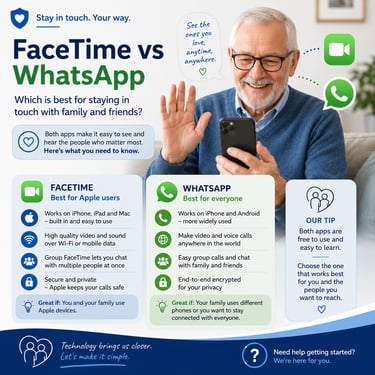
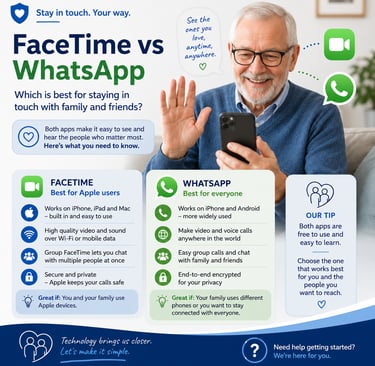
Both apps are completely free, both let you see the person you're calling face-to-face, and both are easy to use once you know how. The main difference comes down to one simple question: what phone does your family use?
FaceTime — best for Apple families
FaceTime is Apple's own video calling app. It comes already installed on every iPhone and iPad — you don't need to download a thing or create any account. If you have an iPhone, it's already waiting for you.
To make a FaceTime call, you simply open the app, find the person's name in your contacts, and tap the camera icon. That's genuinely all there is to it.
The picture and sound quality are excellent, and because Apple designed it specifically for their devices, everything works very smoothly.
The catch: FaceTime only works if both you AND the person you're calling have an Apple device (iPhone, iPad or Mac). If your son has an Android phone — like a Samsung — FaceTime won't work between you.
WhatsApp — best for mixed-device families
WhatsApp works on any smartphone — whether it's an iPhone, Samsung, or any other Android device. That makes it the more flexible choice for most UK families, where it's common for different members to have different phones.
WhatsApp also works for calls to family overseas — completely free, no international charges, no matter how long you chat. Many UK seniors already use WhatsApp for messaging; video calling is just one extra tap from a conversation.
You will need to download the WhatsApp app if it's not already on your phone (it's free from the App Store or Google Play), and both you and the person you're calling need to have it installed.
So which should you use?
Here's a simple way to decide:
• Everyone in your family has an iPhone or iPad → use FaceTime
• Your family has a mix of iPhones and Android phones → use WhatsApp
• You want to call family abroad → use WhatsApp
• You want to call more than one person at the same time → either works, but WhatsApp group calls are very simple to set up
What about Zoom and Google Meet?
Both are excellent for organised group calls — for example, a family catch-up with several people joining at once from different devices. They're also widely used for GP appointments done online and for community meetings. You can find our full guides to both on the website.
For everyday one-to-one calls with a family member, though, FaceTime or WhatsApp will usually be simpler.
Tips for your first video call
1. Tell the person you're going to call that you'll be trying it — so they're ready to answer
2. Find a quiet spot with good light (sit facing a window if you can)
3. Prop your phone or tablet up so you don't have to hold it
4. Don't worry if it goes wrong the first time — just hang up and try again. It gets easier every time.
Ready to give it a go?
Whichever app you choose, the most important thing is simply to try. The first call is always the trickiest — after that, it quickly becomes second nature.
For full step-by-step guides to WhatsApp, FaceTime, Zoom, and Google Meet, visit freecallsforseniors.co.uk. Each guide is written in plain English, with no jargon.
Know someone who's been putting off their first video call? Share this article with them — it might be just the nudge they need. 💛
Free Calls for Seniors
Guides and tips for easy calls
Contact
Subscribe
© 2026. All rights reserved.